Top Tips for Installing CCTV Systems Like a Pro
As we move further into 2026, the importance of security systems cannot be overstated. With advancements in technology and an increasing need for safety, CCTV systems have become essential for both residential and commercial properties. Installing these systems can seem daunting, but with the right approach and knowledge, you can ensure a professional setup. This article will provide you with comprehensive tips to install your CCTV system like a pro, ensuring optimal functionality and security.
Understanding Your CCTV System Components
In 2026, the market offers a variety of CCTV systems, each with different components and features. Recognizing each part's role is crucial for effective installation. Typically, a CCTV system includes cameras, a digital video recorder, a power supply, and cables. Understanding how these components interact will guide you in setting up your system efficiently.
Camera types vary significantly, from dome cameras that blend into ceilings to bullet cameras designed for specific directional views. When selecting a camera, consider the area you need to cover and the level of detail required. For example, if you are monitoring a parking lot, a high-resolution bullet camera may be more suitable than a dome camera, which is better for indoor settings.
Choosing the Right Location
Choosing the right location for your cameras is critical. In 2026, many installations are completed with the aid of apps that allow you to visualize camera placement. Start by creating a layout of your property and identifying areas that require surveillance. Consider entry points, blind spots, and high-traffic areas.
For residential installations, typical locations include front and back doors, driveways, and living rooms. In commercial settings, focus on entrances, hallways, and cash registers. Ensure that cameras are positioned at least nine feet off the ground to prevent tampering, and angle them to avoid obstructions such as trees or walls.
People Also Look For:
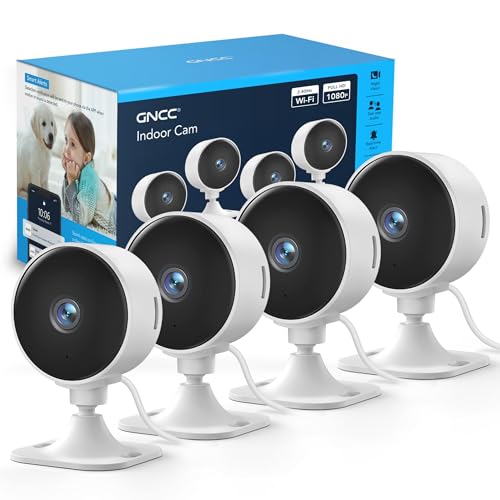
- GNCC GC3 4-Pack CCTV Cameras for House Security, 1080P Indoor Camera with Pet/Baby Monitoring, Fixed Lens, 2 Way Audio, Cloud/SD, ...
- 12V 1A Power Supply Adapter, Etopgo Universal AC to DC Power Adapter with 7 Tips for Electronic Devices LED Strip Lights CCTV Came...
- senri Indoor Security WiFi Camera 1080P HD, Wireless CCTV Camera for Home/Baby/Pet, Baby Monitor with Night Vision, 2-Way Audio, M...
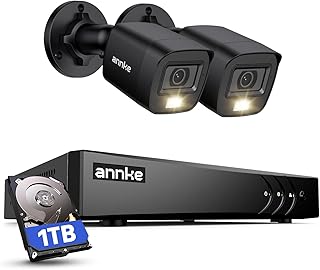
- ANNKE E200 CCTV Camera System, 4 Channel 3K Lite Surveillance DVR with 2x 1080p Dual-Light Cams and 1TB Hard Drive, Smart Human & ...
- Private property no trespassing, trespassers will be prosecuted cctv cameras in operation Safety sign - 1mm Plastic sign (300mm x ...
Wiring and Power Supply Considerations
Wiring is another crucial aspect of CCTV installation. In 2026, many systems utilize Power over Ethernet technology, which simplifies the process by allowing data and power to be transmitted through a single cable. This method reduces clutter and the need for multiple cables. However, if your system requires separate power sources, plan your wiring strategy carefully.
When running cables, make sure to avoid areas with high electromagnetic interference, such as near electrical panels or fluorescent lights. Using shielded cables can also help reduce interference. Additionally, consider using conduit to protect cables from weather conditions or physical damage, especially if installed outdoors.
Testing and Adjusting Camera Angles
Once your cameras are installed, testing and adjusting their angles is essential to ensure coverage. In 2026, many systems come with mobile applications that allow remote access to camera feeds. Use these apps to check the camera views from different angles before finalizing their positions.
Adjust the cameras to cover the desired field of view and eliminate blind spots. For instance, if you're monitoring a driveway, ensure the camera captures the entire area, including the entrance and any vehicles parked. Take the time to fine-tune the settings of each camera, including brightness and contrast, for optimal image quality.
Integrating Smart Features for Enhanced Security
In 2026, integrating smart features into your CCTV system can significantly enhance your security capabilities. Many modern cameras come with features such as motion detection, alerts, and cloud storage options. These functionalities allow you to monitor footage in real time and receive notifications when unusual activity is detected.
For example, if your system detects motion in a designated area, it can send an alert to your smartphone. This allows you to respond quickly to potential threats. Moreover, many systems offer cloud storage options that ensure your footage is saved securely and accessible from anywhere. This is particularly useful in case of theft or vandalism, as you can retrieve footage remotely.
Regular Maintenance for Longevity
Maintaining your CCTV system is critical for ensuring its longevity and effectiveness. In 2026, many homeowners and businesses overlook regular maintenance checks, which can lead to system failures. Schedule routine checks to clean the lenses, verify connections, and update software as needed.
Cleaning the lenses of your cameras will enhance image quality by removing dust and dirt that can accumulate over time. Additionally, ensure that all cables and connections are secure and free from damage. Regularly check for software updates from the manufacturer, as these updates can improve system performance and address security vulnerabilities.
By following these expert tips, you will be well on your way to installing a CCTV system that not only meets but exceeds your security needs in 2026. The benefits of a well-installed system are immense, providing peace of mind and safeguarding your property from potential threats. As technology continues to evolve, staying informed and adapting your installation techniques will ensure you remain at the forefront of security solutions. The journey to perfecting your CCTV setup continues as innovations emerge, allowing for even more sophisticated installations and configurations.